
Representation
Azor.ID allows you to perform digital services on behalf of another citizen, whether a family member or friend, simply and securely. This resource ensures that citizens with difficulties using technology or traveling to public Adherent Platforms can also access their services.
Does this option ensure the security of the representative and the person being represented?
With Azor.ID, the representation option ensures total security for both the representative and the represented person. The permission for representation is only granted after the authentication of the individual who will interact with the service, and the user must indicate that they wish to perform the operation on behalf of someone else, selecting which user they are representing from a provided list. Watch the video below for a demonstration of how the process works.
How to request to represent another citizen
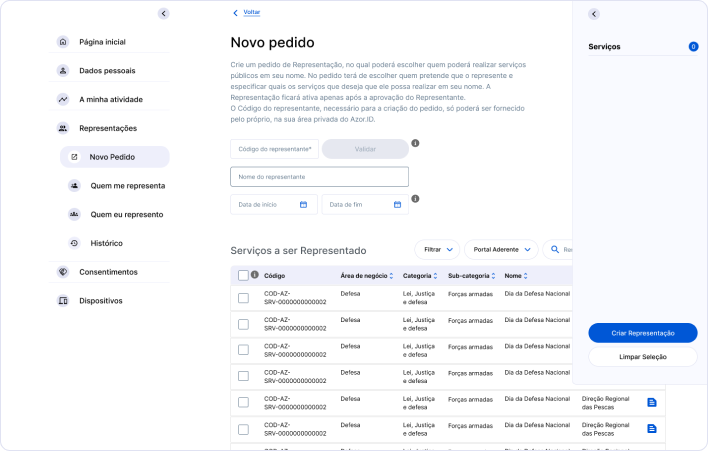
To access services on behalf of another citizen, you must first log into the Azor.ID platform, log in, and select the 'Representations' option from the left side menu. In this section, click the button indicating 'New Request'. When selecting New Request, you must enter the code of the person you wish to represent. This code is unique to each person and should be consulted from their respective Azor.ID account.
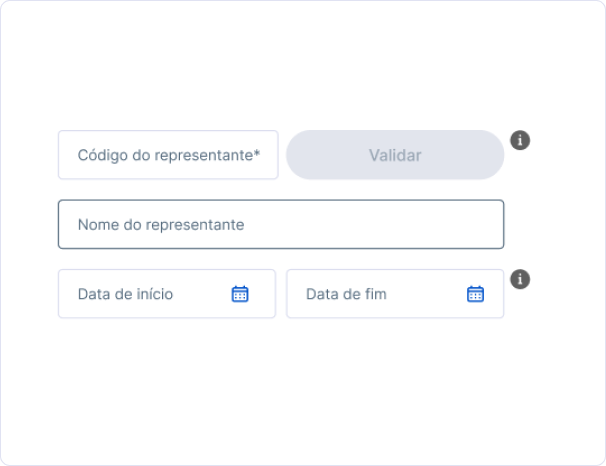
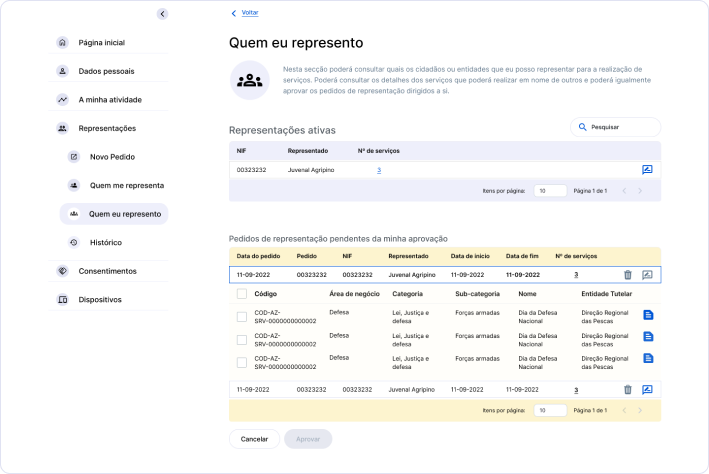
The name of the representative will automatically appear. You must also fill in the period during which you want the representation to be valid, with a maximum of 1 year. Next, a table will appear where you must select the services to be represented. To create the representation, just select them and create the representation. This approval must be done in the respective Azor.ID account of the user you wish to represent, also in the 'Representations' section, where they should view the request from the 'Who Represents Me' list and select 'view details' for the respective request.
Then, the representative on the 'who I represent' screen must approve the respective request.
Explanatory Videos
How Representation Works
In the following video, we show you how to authenticate on behalf of the person you represent with your Azor.ID on the adherent platforms of the Regional Government of the Azores.
Available soon
How to Request Representation on Azor.ID
In the following video, we show you how to make and/or approve representation requests on the Azor.ID platform.